
Storm Shield
Mosaic SrlWeather
3.01.75K Reviews
- Version
- 6.0.0
- Installs
- 100.00K
- Age Rating
- Everyone
Screenshots
Our Review of Storm Shield
 Analysis by Appyee
When I judge a weather app, I care less about a screen full of forecasts than about whether its warnings help me make a sensible decision. Storm Shield is built around severe-weather alerts, so I see it as a practical companion for people who want to pay attention when conditions may become dangerous—not as a replacement for checking local guidance or using common sense.
Trust starts with a focused purpose
The app is a free weather app from Mosaic Srl, and its emphasis on NOAA severe-weather alerts for your location gives it a clearer job than an all-purpose forecast dashboard. It has been available since September 5, 2012, and its current version is 5.0.2. The store shows an average rating of 3.3 from around 3,500 ratings, alongside more than 1,700 written reviews and over 100,000 installs. That reception is mixed rather than universal, which is a useful reminder to try its approach yourself instead of assuming it will suit every routine.
Storm Shield is rated for everyone, though the subject matter is most useful to people who may need to respond to severe weather: families, commuters, outdoor workers, travelers, and anyone who wants an alert close at hand. I would keep it in the role of a warning tool. A notification can prompt me to pay attention, but it is not a reason to ignore official instructions, a changing sky, or a safer place nearby.
What I would check before relying on it
Location is central to an app intended to deliver alerts for where you are. Before relying on it, I would review the location choices presented by the app and decide what level of access makes sense for my use. If I only need to check conditions before leaving home, I may prefer to enter or select a location when I use the app, if that option is available. If I expect warnings while moving, I would consider whether the available location setting supports that need and whether I am comfortable with it.
I would also look at the app’s permission prompts rather than tapping through them automatically. Permissions are a user choice, not a guarantee that an app is more accurate, and I would grant only what feels necessary for the functions I plan to use. The same goes for notifications: they are valuable only if I can hear or notice them when it matters, so I would check the device’s notification settings and make sure a focus mode or silent setting is not hiding an alert I intend to receive.
Plan for the moments when alerts matter
My most practical use would be setting up the app before a busy day, not during a storm. I would check that the selected location is right, choose the alert settings that match my needs, and make sure notifications are enabled at the phone level. If I am traveling, I would review the destination ahead of time rather than assume a home-focused setup will cover every place I visit. These small checks make an alert app more useful without asking me to watch the screen constantly.
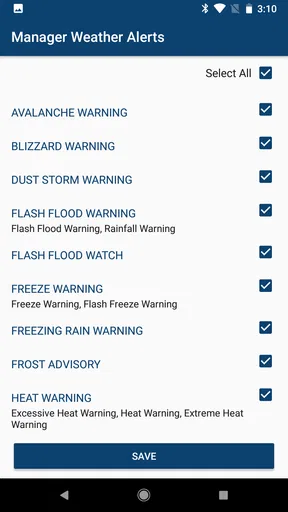
There is a trade-off between staying informed and being interrupted. Too many notifications can make me start ignoring them, while settings that are too restrictive can leave me less aware of a warning. I would tune alerts to the kinds of severe conditions I genuinely need to know about, then revisit that choice when my routine changes—for instance, before a trip or when I expect to spend more time outdoors. The best setup is not necessarily the loudest one; it is the one I will notice and act on.
What’s the Buzz About?
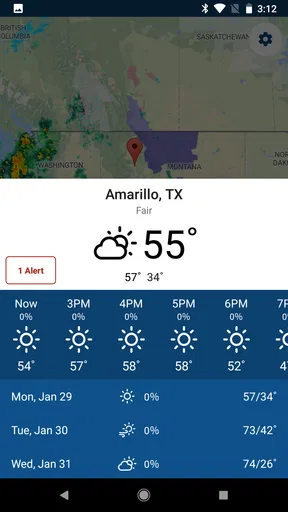
The first thing you notice when you install Storm Shield is its clean interface. It doesn’t overwhelm you with unnecessary clutter; instead, it provides all the essential weather updates and alerts in a straightforward manner. I mean, who has time to sift through complicated menus when you just want to know if you need a raincoat?
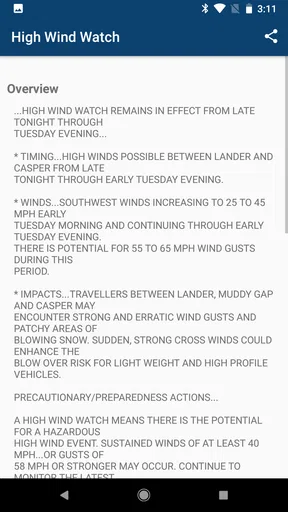
The app offers real-time weather data, and I was particularly impressed with its precise severe weather alerts. These alerts are lifesavers, providing notifications for anything from thunderstorms to tornado warnings. And let me tell you, if you live in a region where the weather can be unpredictable, this feature is an absolute must-have.
Digging into the Features
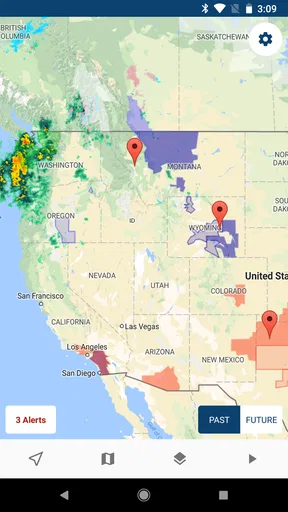
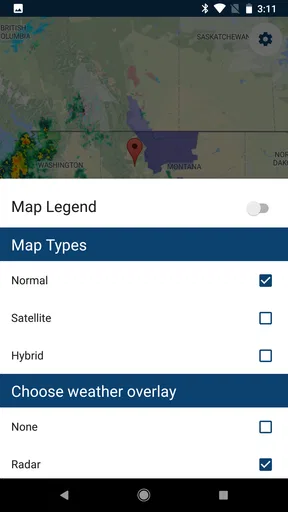
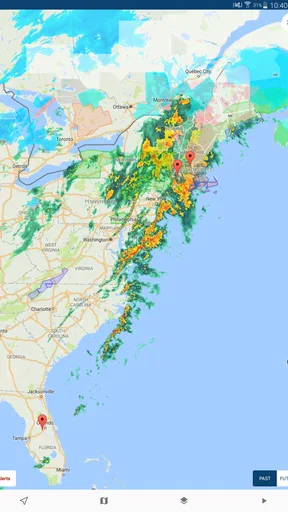
One of my favorite features is the radar map. It’s incredibly detailed and lets you see exactly where that storm is brewing. You can zoom in and out, and the map updates in real-time, so you’re always in the know. Plus, it’s kind of fun to track the storm’s path and feel like a mini meteorologist.
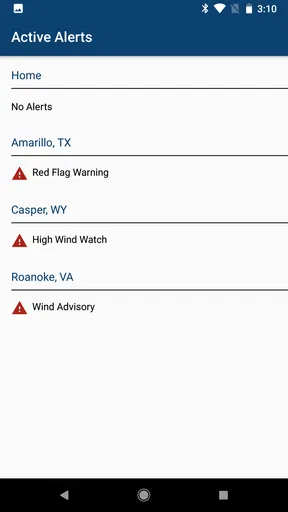
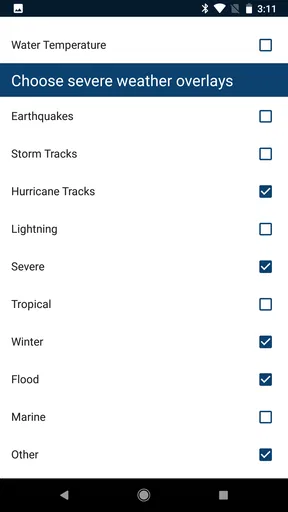
Another awesome feature is the customizable alerts. I love how you can set the app to notify you about weather changes specific to your location or anywhere else you might be planning to visit. It’s perfect for planning trips or just knowing when to hunker down at home.
Also, the app’s voice alerts are a neat touch. Sometimes, I’m too busy or my hands are full, so having the app speak to me ensures I never miss an important update.
Digging into the map and alerts
The radar is most useful to me when I turn it into a decision-making tool rather than a spectacle. Before leaving, I can look at the direction and shape of a weather system and consider whether a short errand can wait, or whether I should choose an indoor plan. Zooming in can help me relate the map to familiar roads and neighborhoods, but I would avoid treating a visual estimate as a promise about exactly when rain will reach my doorstep. Radar helps me understand what is developing; it does not remove uncertainty from local weather.
For a realistic example, imagine I have an outdoor appointment later in the day and a long drive across town. I would check the destination as well as my current location, then use alerts as a reason to reassess the plan if conditions worsen. I would not wait for a notification to decide whether to drive into visibly dangerous weather. The useful habit is checking ahead, keeping a safer alternative in mind, and letting an alert reinforce—not replace—my judgment.
Customizing alerts for a place I plan to visit can also help with trips that involve more than one stop. I would add or select the relevant destination before setting out, then make sure I understand which location the app is monitoring. That simple check avoids a common mistake with location-based tools: assuming that the place currently shown is automatically the place I care about later. For frequent travel, I would review saved locations periodically so an old destination does not distract me from today’s plans.
Voice alerts have a different strength from radar. They can be useful when I am cooking, carrying bags, or focused on a task and cannot keep checking a screen. But spoken information is only helpful if I can hear it clearly and if the phone is configured to allow it; I would test the sound in an ordinary moment rather than discover a setting problem during bad weather. In a quiet office, a spoken alert may be intrusive, so I would balance convenience with where I expect to use the phone.
Where it fits among weather apps
Compared with a typical general-purpose weather app, Storm Shield makes more sense to me as a companion for warnings and storm awareness than as the one screen I use for every weather question. A basic forecast app may be quicker for checking the day’s high and low or deciding what to wear. A broader weather service may suit someone who wants many forecast views in one place. Storm Shield’s appeal is more specific: radar, severe-weather alerts, location choices, and voice notifications described in the app experience above.
I would not install it expecting every weather need to disappear into one tool. If my main concern is a simple daily forecast, another app with the layout and forecast details I prefer may be more convenient. If I spend time outdoors or in places where severe conditions can change plans quickly, having a dedicated alert-focused option alongside my usual forecast is a more sensible arrangement. Keeping both roles clear also reduces the temptation to mistake a warning app for a complete source of safety advice.
That distinction matters when comparing apps because a polished map is not the same thing as a forecast I can use for every decision. I would judge Storm Shield by whether its alerts and location setup fit my habits, not by how many panels or measurements another weather app displays. Someone who enjoys exploring radar may appreciate the map, while someone who wants a quick glance and nothing more could find a separate daily forecast easier to live with.
Everyday Usability
Using the app daily, I’ve found it to be pretty intuitive. The navigation is smooth, and you don’t need to be a tech wizard to figure things out. I particularly appreciate that it doesn’t drain my battery, which is a huge plus considering some weather apps can be quite the energy hogs.
The forecast accuracy has been spot-on for me. Whether it’s planning a weekend hike or just deciding on an outfit for the day, having reliable forecasts makes life so much easier.
Limits worth keeping in mind
Weather information is inherently uncertain, and even a useful alert cannot tell me what conditions will be like at every street corner or at the exact minute I leave. I would treat a warning as a prompt to check the situation and take it seriously, not as a guarantee that a particular route is safe or unsafe. For decisions involving immediate danger, local emergency instructions and direct observation matter more than satisfying curiosity on a map.
There is also a practical cost to depending on a phone for alerts: the device needs to be available, its notification settings need to allow the messages through, and I need to notice them. If I work somewhere noisy or often keep my phone out of reach, I would not make this app my only way of receiving important information. I would consider how I actually use my phone and keep other sensible ways of staying aware in mind.
The price is free to download, with in-app purchases listed at $5.99 per item. I would check what an offered purchase includes and whether I genuinely need it before paying; the basic decision to try the app does not require treating every optional purchase as essential. It is available for devices running iOS 9 or later, so compatibility is worth checking before making it part of a routine, especially if I use an older device.
Is It Worth It?
So, is Storm Shield worth downloading? If you ask me, absolutely. It’s like having a personal weather station in your pocket. The peace of mind it offers with its timely alerts and accurate forecasts is invaluable, especially if you’re someone who likes to stay prepared.
Overall, Storm Shield is a solid choice for anyone looking for a comprehensive and user-friendly weather app. Whether you’re a weather enthusiast or just someone wanting to avoid getting caught in a storm, this app will have you covered.
So, don’t just take my word for it. Give it a try and see how it fits into your daily routine. And hey, you might just find yourself becoming a bit of a weather buff like me!
Who I’d recommend it to
I would give it a try if severe-weather awareness is a meaningful part of my routine: perhaps I commute through changeable conditions, organize outdoor activities, or want a quick way to check a storm’s progress around a planned destination. It may also suit someone who prefers a focused alert tool and is willing to spend a moment setting up locations and notification choices rather than relying on a default forecast screen.
I would skip it, or at least avoid making it my main weather app, if all I want is a fast answer about whether to take a jacket, if I rarely use phone notifications, or if I prefer not to grant location access to weather tools. The app’s value depends on my comfort with its location and alert setup, as well as whether I will actually respond to the information. A cautious first test—checking the chosen place, reviewing permissions and notification controls, and seeing how it fits alongside my usual forecast—is a better start than assuming any weather app deserves automatic trust.
Verdict
Strengths of Storm Shield
- Accurate weather alerts in real-time.
- Customizable notification settings.
- Includes radar and detailed forecasts.
- Covers multiple locations efficiently.
- User-friendly interface design.
Limitations of Storm Shield
- Requires a subscription for full features.
- Can drain battery with frequent updates.
- Ads can be intrusive in free version.
- Occasional lag in loading maps.
- Limited offline functionality.
Other Releases by Mosaic Srl
View All
Weather Live°
Weather4.4

Clime: NOAA Weather Radar Live
Weather4.2

Blossom - Plant Identifier
Education4.4

Planes Live - Flight Tracker
Travel & Local4.0
Similar Picks in This Category
View All
Weather - By Xiaomi
Xiaomi Inc.4.1

Weather & Radar Forecast
WetterOnline4.8

Weather
OneLouder Apps4.6

AccuWeather: Weather Radar
AccuWeather3.6

The Weather Channel - Radar
The Weather Channel4.6

1Weather Forecasts & Radar
OneLouder Apps4.3
Frequently Asked Questions
What is Storm Shield and how does it work?
Storm Shield is a weather application designed to provide real-time severe weather alerts and forecasts for specific locations. It uses your device's GPS to track your location and send notifications about storms, tornadoes, and other weather conditions. The app utilizes data from the National Weather Service to ensure accuracy and timeliness.
Is Storm Shield available for both Android and iOS devices?
Yes, Storm Shield is available for download on both Android and iOS platforms. Users can find it on the Google Play Store for Android devices and the Apple App Store for iOS devices. The app supports a wide range of devices, ensuring most users can access its features.
Are there any subscription fees or in-app purchases?
Storm Shield offers both free and premium versions. While the free version provides basic weather alerts, the premium version unlocks additional features like advanced radar, extended forecasts, and ad-free experience. Users can choose to subscribe to the premium version through in-app purchases.
How reliable is Storm Shield in providing severe weather alerts?
Storm Shield is highly reliable, as it sources its data directly from the National Weather Service. It is designed to deliver timely and accurate alerts to help users stay informed and safe during severe weather conditions. However, users should ensure their device settings allow the app to access location services for optimal performance.
Can I customize the types of alerts I receive from Storm Shield?
Yes, Storm Shield allows users to customize the types of weather alerts they receive. You can choose to receive notifications for specific weather events like tornadoes, thunderstorms, or floods. This ensures you only get the information that is most relevant to you, helping you manage alerts efficiently.
